

Harness the Power of Robust Automation for No-Hassle Fulfillment

No matter how large or small your eCommerce business is at the moment, there’s no denying that you could use more time in your day to help improve it. Shipping and fulfillment, while very much the backbone of any successful eCommerce operation, is often also one of the most time-intensive aspects of running an eCommerce business.
At ClickShip, our shipping and fulfillment tools are a point of pride, and we continue to develop and refine those tools to help streamline every aspect of your eCommerce shipping strategy.
Our Shipping Rules have been a feature for some time, but like you, we weren’t content to simply release something and leave it at that. With that in mind, we are thrilled to introduce our all-new, more robust Advanced Shipping Rules feature!
What Are Shipping Rules?
ClickShip’s shipping rules are a series of if/then statements that let you automate how and where orders from your storefront or marketplace are fulfilled.
When you receive an order on ClickShip, it will recognize any variables you set, and automatically apply the rules to your booking.
With our new Advanced Shipping Rules, ClickShip users get access to more rule variables, unlimited rules across all your sales channels, and a redesigned, intuitive UI.
What Makes Advanced Shipping Rules Different from Basic Shipping Rules?
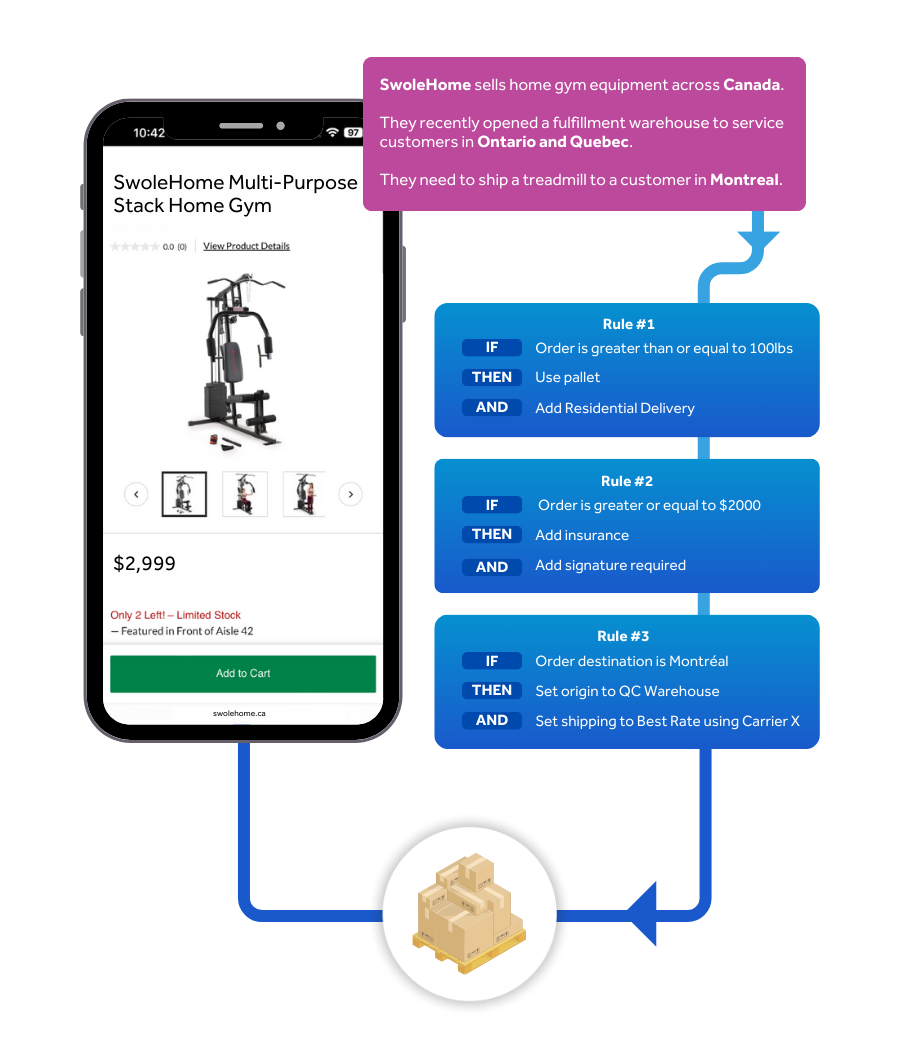
While ClickShip’s Basic Shipping Rules offer eCommerce professionals the ability to create a series of linear automated rules for order fulfillment, Advanced Shipping Rules takes that concept and expands upon it to offer a more robust experience.
This is done through two main differences: more variables and stacking variables.
Basic Shipping Rules offers users a series of four “If” conditions and five “then” conditions, each of which can be used once per rule.
By comparison, not only do Advanced Shipping Rules unlock double the number of variables you can choose, they also give you the ability to stack those variables within a single rule.
This added flexibility opens up the opportunity for you to craft thousands of rules to custom-tailor your order fulfilment to meet your business needs!
|
“If” Variables |
“Then” Variables |
|
Order Weight |
Set Additional Options* |
|
Order Date* |
Shipping Origin* |
|
Marketplace |
Set Package Size* |
|
Customer Names* |
Add Insurance |
|
Product Description* |
Set Shipping Preference |
|
Shipping Destination |
Set Shipping Rate |
|
Order Value |
Autofulfillment* |
|
SKU* |
Add Tags* |
*Only Available for Advanced Shipping Rules
How to Set Up Your Shipping Rules
To begin, log into ClickShip. Under the Billing and Invoices tab, click the Manage Add-Ons button, click the Switch to Advanced button located under the Advanced Shipping Rules section*.
Once you signed up for Advanced Shipping Rules, head over to your Settings dashboard, select Advanced Shipping Rules on the sidebar, and click “Add New Rule” to get started!
For a detailed explanation on how to create your advanced shipping rules, check out this video tutorial!
Experience the Most Advanced Shipping Platform on the Market with ClickShip
ClickShip’s Advanced Shipping Rules are simply the latest addition to the suite of shipping and fulfillment tools that make ClickShip the most complete eCommerce shipping platform on the market today.
ClickShip also integrates with the leading eCommerce platforms and online marketplaces to help you offer better rates on pallet and parcel shipping to your customers in real time, from the leading carriers in North America, and all for zero start-up or monthly fees!
Contact one of our shipping experts today and see everything that ClickShip can offer your eCommerce business.

Please note that Advanced Shipping Rules is a premium upgrade. ClickShip customers who enable advanced shipping rules will get 1 month free to try and then will be automatically billed $29.99 CAD monthly, with the option to cancel at any time.